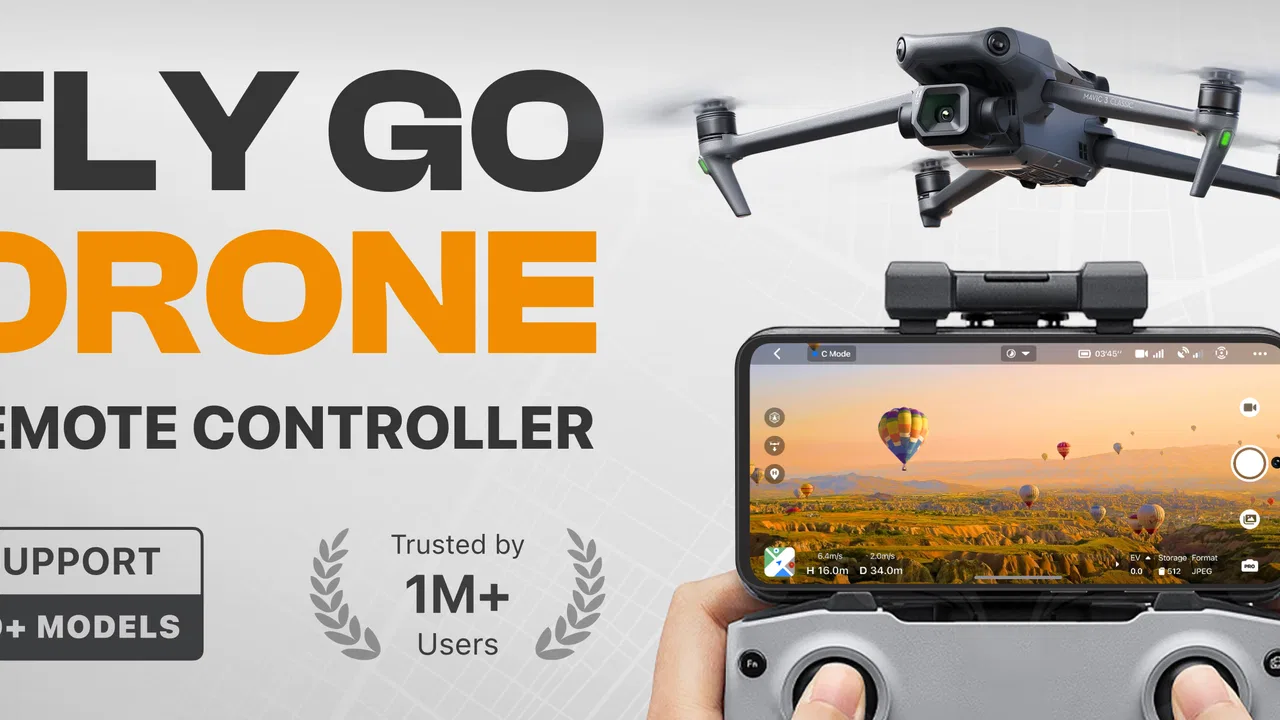
Go Fly Drone Remote Controller
- 4.3
- Rating
- 5.00M
- Installs
- Free
- Price
 Analysis by App-foxy
I approached Go Fly Drone Remote Controller as a practical tool rather than a complete flying course or a replacement for a drone itself. Its job is straightforward: help control compatible flying camera drones from a phone. That sounds simple, but the useful question is whether the app makes the moments before, during, and after a flight less awkward. After spending time with it, I see a convenient option for casual pilots who want one controller app for a broad range of supported models, while experienced flyers may still prefer a manufacturer-specific solution when precision and advanced control matter most.
The app sits in the tools category and is developed by Apponfire Co. Ltd. It is free to install, aimed at everyone, and currently listed as version 1.5.0 for devices running Android 10 or newer. There are optional in-app purchases ranging from $3.99 to $69.99 per item, so I would treat the free installation as a chance to check compatibility and workflow before spending anything. The application has built a substantial audience, with over five million installs and an average rating of 4.3 from around eighty-eight thousand ratings.
How the controller feels before and during a flight
Before I judge a phone controller, I focus on how clearly it guides me from opening the app to checking the aircraft’s response—not on how many controls fit on the screen. That first stretch matters most when you are new, because a calm, close-range test can show whether your chosen drone profile and setup make sense before you commit to a flight.
You May Also Like

 Blood Strike: 2.5 Anniversary
Blood Strike’s Loadouts Turn Every Drop Into a Tactical Gamble
A close look at Blood Strike’s custom loadouts: how fast access to signature weapons reshapes its battle royale rhythm, rewards preparation, and narrows the gap between fights.

 Pandora - Music & Podcasts
Pandora’s Music Is Easy to Start, but Harder to Recover
Pandora’s strength is its low-effort path from a seed to a station. Its weak spot is how much confidence it asks you to place in connection, setup, and quiet recovery.

 8 Ball Pool
 Is Built on Rivalries, Rematches, and Routine
A close look at the rivalries, rematches, shared routines, and unanswered safety questions that turn a quick pool match into a persistent mobile community.

 Samsung Music
’s Quiet Strength Is Playing What You Already Own
Its reach comes less from spectacle than from dependable access to a personal library. That simplicity is both the app’s strongest retention engine and its ceiling.

 AccuWeather: Weather Radar
AccuWeather Review: A Quick, Clear Forecast for Everyday Decisions
For everyday plans, the best forecast is the one you can understand quickly. AccuWeather makes rain timing, radar, and local conditions easy to act on, with a few trade-offs.

 Hill Climb Racing
Why Hill Climb Racing Still Turns Crashes Into One More Run
A tiny car, a bumpy hill and one more upgrade: Hill Climb Racing keeps resurfacing because its simple chaos makes every near-miss feel personal.
More From Our News Desk



Speed expectations: quick setup matters more than raw performance
The first thing I noticed is that a phone-based drone controller is judged less by flashy presentation and more by how quickly it gets out of the way. When I want to fly, I do not want to search through several unrelated utilities, guess which screen contains the connection controls, or waste the best part of a short outdoor session preparing the app. Go Fly Drone Remote Controller is most appealing in that context: it is designed as a central control point for more than forty drone models, which can reduce the need to keep separate controller apps for different inexpensive aircraft.
That broad compatibility is also the main reason not to assume instant results. A multi-model controller has to serve different hardware configurations, so the experience depends heavily on choosing the right drone profile and following the connection sequence carefully. I would not evaluate its speed only by how fast the app opens. The more meaningful test is whether the phone, aircraft, and any required wireless connection become ready without repeated guesswork. If the pairing process is smooth for your model, the app can feel pleasantly direct. If the model is not properly supported, no amount of tapping will turn it into a dependable flight controller.
For a first flight, I recommend preparing indoors but testing the actual connection with the drone nearby and powered in the correct order. Keep the phone charged, close apps that may interrupt attention, and avoid trying to learn the controls while standing in a crowded place. This is not because the app promises a particular speed advantage; it is simply the safest way to separate setup problems from flying problems. A few minutes of preparation can make the controller feel much faster in real use.
The controls are best understood as an interface between the pilot and the aircraft, not as an automatic pilot. A phone screen can make virtual controls feel accessible, but it does not remove the need to watch the drone, understand its surroundings, or react promptly. I found the app more suitable for short recreational flights than for situations where every response must be familiar from professional practice. That distinction is important: convenience is its strength, while specialist precision belongs elsewhere.
Heavy-use moments: where a simple controller earns its place
The most convincing use case is a household with a few compatible drones or a beginner who has inherited an aircraft without wanting to install a different application for every model. In that situation, a broad controller can make the phone feel like a shared tool. One family member can use it for a quick look around the garden, then another can prepare a different supported drone without changing the entire approach to the device.
A realistic example would be a weekend outing where I bring a compact camera drone to an open field. Before leaving, I would confirm the phone meets the Android requirement, charge both devices, and identify the correct model inside the app. At the location, I would start with a low, short test flight rather than immediately sending the aircraft far away. That first test tells me whether the controls respond as expected, whether the image view is usable, and whether the connection remains steady while the drone is close. If all three are satisfactory, I can gradually extend the session instead of discovering a problem after the aircraft is already distant.
Another useful scenario is troubleshooting a neglected drone. If the original controller application is no longer convenient to maintain, a general-purpose option may be worth trying before abandoning the aircraft. I would still keep expectations measured. Compatibility with a model does not necessarily mean that every capability feels identical to the original manufacturer’s software. A general controller may be enough for basic flight and camera use, but a dedicated alternative may expose model-specific settings more clearly.
Heavy use also reveals the practical cost of relying on a phone. During a long outdoor session, the screen may become difficult to read in bright light, notifications can distract from the controls, and the phone’s battery has to serve both the app and the rest of the device. I suggest using a phone that is not needed for an urgent call or navigation during the flight. If the phone is your only communication device, the convenience of this app may not outweigh the interruption risk.
My most useful habit was to treat each flight as a short checklist rather than assuming that a previous successful connection guarantees the next one. I check the selected model, verify that the controls are visible, keep the aircraft nearby for the first response test, and land before the phone becomes too warm or low on charge. These are ordinary precautions, but they matter more with a phone controller because the device is doing several jobs at once.
Reliability: consistency depends on the whole setup
I would describe the app’s reliability as conditional rather than absolute. The software can be useful when the phone, drone model, operating system, and wireless environment cooperate. The app is not the only link in that chain. A weak aircraft battery, an unsuitable phone, a crowded wireless area, or selecting the wrong model can make the experience appear unreliable even when the application itself has opened normally.
That is why I would test the connection before traveling to a special location. A brief indoor check, with the propellers treated safely and the aircraft secured as appropriate, can reveal whether the model is recognized and whether the control layout appears. I would not perform an actual flight in a confined room simply to test the app. The goal is to confirm readiness without creating a new risk.
Recovery is another area where expectations should remain realistic. If the connection becomes unstable, my priority would be to keep the drone close, avoid aggressive movements, and follow the aircraft’s own safe operating procedure. I would not rely on an app alone to rescue a drone from a difficult situation. Any recovery behavior can depend on the aircraft and its firmware, so the sensible approach is prevention: fly within clear sight, start conservatively, and avoid treating the phone interface as a guarantee against signal or hardware trouble.
The app’s broad model support is valuable, but it also means I would be especially careful after switching aircraft. Before takeoff, I would confirm that the on-screen layout matches the drone in front of me. A control arrangement that feels familiar can still produce an unpleasant surprise if the selected profile is wrong. This is one of the less obvious trade-offs of a universal controller: it reduces app clutter, but it makes model verification part of the pilot’s routine.
With an average score of 4.3, the reception is encouraging, and the large number of ratings suggests that the app has been tried by many different users. I still would not use that figure as a substitute for a compatibility check. A rating reflects a wide variety of phones, drones, expectations, and flying conditions. For my own decision, the decisive question is whether the exact aircraft I own behaves predictably during a cautious test flight.
Device constraints: the phone becomes part of the flight equipment
The minimum operating system is Android 10, so older phones are immediately outside the intended range. That requirement is easy to overlook when the drone itself is inexpensive or several years old. Before installing, I would check the phone’s Android version and make sure there is enough free space for normal operation. I would also avoid using a device with a damaged screen or an unreliable touch panel; small control errors are more serious when the phone is acting as the transmitter.
Screen size creates a practical compromise. A larger display can make controls and camera imagery easier to see, but it may be heavier to hold and less comfortable outdoors. A small phone is easier to carry, yet the interface may feel crowded, especially for someone who is still learning which virtual control does what. I would choose the clearest, most responsive phone available rather than automatically using the newest or most expensive one.
Resource demands are difficult to judge from the application alone because the connected drone and camera feed can place additional demands on the device. In my experience, any controller that combines live viewing with touch controls deserves a cool, well-charged phone. I would remove a thick case if the device tends to heat up, keep the display brightness high enough to see safely, and avoid beginning a flight with several demanding apps running in the background.
There is also a privacy and attention trade-off inherent in using a personal phone. Calls, messages, alarms, and system prompts can appear at exactly the wrong moment. I recommend enabling a suitable interruption-free mode where appropriate, while remembering that a phone may still need to remain reachable in an emergency. The app is convenient because it uses hardware I already own, but that convenience means the flight shares space with everything else on the phone.
The optional purchase range deserves a careful look before committing. The app itself is free, which makes initial testing easier, but paid items can become significant at the upper end of the range. I would first establish that the controller works with my drone, that the interface is comfortable, and that it meets my actual flying needs. For occasional flights, paying for extras may not make sense. For someone who uses several supported models regularly, the value calculation could be different, but I would still judge each purchase by a clear improvement in the workflow rather than by curiosity.
Who should use it, and who should choose something else?
I think this app is a good match for casual drone owners, beginners, families sharing compatible aircraft, and people who value having a single controller app for a wide selection of models. It is particularly sensible when the alternative is keeping several confusing utilities installed and remembering which one belongs to which drone. The free entry point also makes it easier to try the basic setup before deciding whether the experience suits you.
I would be more cautious about recommending it to a pilot who depends on highly specialized controls, detailed aircraft telemetry, advanced camera configuration, or a manufacturer’s tightly integrated safety workflow. In those cases, the official app for the exact drone may be the better choice, even if it is less convenient across multiple models. A dedicated application generally has a narrower job, and that narrower focus can be an advantage when the aircraft is expensive or the flight is important.
I would also skip it as a first choice if my phone is old, frequently overheats, has poor touch response, or is needed constantly for other tasks. The app cannot compensate for a device that is uncomfortable to use outdoors. Likewise, someone who wants a physical transmitter with tactile sticks may find a phone interface less reassuring. A hardware controller can be easier to operate without looking down, particularly after the flight becomes more demanding.
One subtle advantage is portability: a phone is already part of my everyday carry, so I do not need to remember a separate controller for a casual outing. The subtle disadvantage is that portability can encourage careless spontaneity. I might be tempted to launch quickly because the app is already available, but a drone flight still deserves a location check, a battery check, and a clear understanding of the controls. Convenience should shorten preparation, not eliminate it.
Performance verdict: useful convenience with sensible boundaries
After weighing the setup, repeated use, and device limitations, I see Go Fly Drone Remote Controller as a practical bridge between a drone and a phone, not as a universal answer for every pilot. Its strongest point is the possibility of managing compatible aircraft through one accessible tool. The support for more than forty models gives it a clear purpose for owners who would otherwise juggle multiple controller apps.
Its performance is best when I keep the conditions simple: a supported model, a suitable Android phone, a clear flying area, a charged device, and a short test before moving farther away. Under those conditions, the app can make casual flying feel less complicated. The perceived responsiveness and stability will still depend on the aircraft and connection, so I would judge it through cautious real-world testing rather than expecting a fixed result from the app alone.
The main friction comes from that same versatility. A controller intended for many drones may not feel as perfectly tailored as software built for one model. Phone limitations also remain visible during longer sessions, bright daylight, heavy camera use, or interruptions from normal mobile activity. These are not reasons to reject the app outright, but they are reasons to plan around it.
For me, the deciding benefit is convenience: install it, identify the compatible drone, test at close range, and use the phone as a familiar control surface. The deciding warning is equally clear: do not confuse a broad compatibility claim with a promise that every model, phone, and flying environment will behave identically. If you want an approachable tool for recreational flights and own a supported aircraft, I think it is worth trying free first. If you need specialist controls, a physical transmitter, or the deepest model-specific features, I would look at the drone maker’s dedicated option instead.
Overall, I would recommend Go Fly Drone Remote Controller to the right kind of user: someone who values flexibility, owns compatible hardware, and is willing to perform a careful connection test before takeoff. The app’s free starting point, Everyone content rating, and current version make it approachable, while the optional purchases mean I would keep spending deliberate. Used with realistic expectations and good flight habits, it is a useful tool rather than a gimmick.
FAQs for Go Fly Drone Remote Controller
01What is Go Fly Drone Remote Controller used for?
Go Fly Drone Remote Controller is designed to connect a compatible drone with an Android or iOS mobile device and provide a virtual control interface. Depending on the supported aircraft, it may let you pilot the drone, adjust flight settings, view the camera feed, capture photos or videos, and review basic flight information. Its exact features depend on the drone model and the version of the app.
02Which drones and smartphones are compatible with Go Fly Drone Remote Controller?
Compatibility should be checked before downloading because this type of controller app is usually made for specific drone hardware rather than every available model. Your drone may need a particular Wi-Fi connection, remote-control system, or firmware version. Also confirm that your Android or iPhone meets the app’s operating-system requirements and has enough storage, permissions, and processing power for live video.
03How do I connect the app to my drone?
In most cases, you need to charge and switch on the drone, enable Wi-Fi or the required wireless connection on your phone, and connect to the network or controller associated with the aircraft. After opening Go Fly Drone Remote Controller, follow its pairing instructions and allow requested permissions. If the connection fails, check battery levels, restart both devices, and verify that another phone is not already connected.
04Does Go Fly Drone Remote Controller work without an internet connection?
The app may not require continuous internet access for basic flight control once the phone is connected directly to the drone or its remote controller. However, internet access can still be necessary for downloading the application, checking updates, signing in, loading maps, synchronizing media, or obtaining firmware files. Before flying in a remote location, test the connection and any essential features at home.
05Is Go Fly Drone Remote Controller safe and easy for beginners?
The app can make drone operation more convenient, but it does not replace the need to learn safe flying practices. Beginners should read the drone’s manual, understand the on-screen controls, calibrate the aircraft when required, and practice in a wide open area away from people, buildings, roads, and restricted airspace. Always check local regulations, weather conditions, battery status, and the connection before takeoff.
Pros
- Simple controls make basic drone operation easy to learn.
- Useful replacement for a lost or damaged physical controller.
- Wireless connection allows freedom of movement during flights.
- Compact interface is convenient for quick takeoffs and landings.
- Can reduce the need to carry an additional remote control.
Cons
- Compatibility may vary between drone models and mobile devices.
- Connection interruptions can affect control during flight.
- Requires a compatible drone with supported remote-control features.
- On-screen controls may feel less precise than a physical transmitter.
- Phone battery drains faster during longer flying sessions.

Go Fly Drone Remote Controller
Gallery